
Overview
Check these settings when the Flipsnack and HubSpot integration does not work as you expect. Each problem links to the article with the full setup.
Requirements
- Plan: Enterprise and up: contact sales
- HubSpot account: Sync works from HubSpot Free. Custom events need HubSpot Professional and up: go to HubSpot
What to do if lead form contacts do not appear in HubSpot
- Open the flipbook and go to Customize > Add-ons > Lead form. Turn on Use lead form, then turn on the HubSpot switch below Allow readers to skip.
- If Allow readers to skip is on, readers can close the form without sending it.
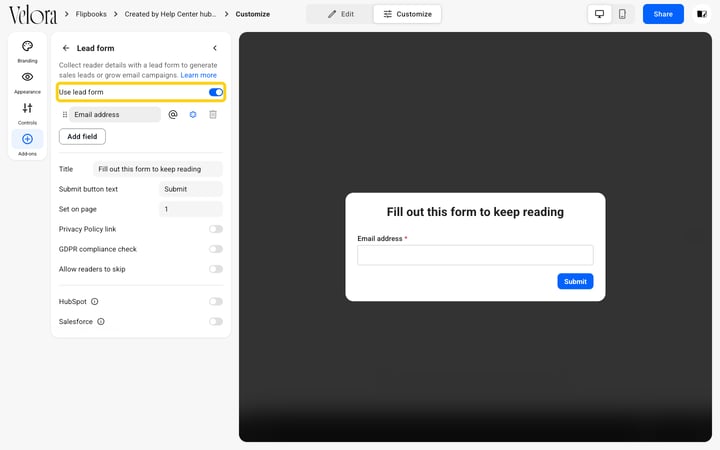
- Map the lead form field that collects the email address to the HubSpot Email property. HubSpot needs it to create a contact.
- Only Contact properties can be mapped.
.png?width=720&name=Screenshot%202025-11-17%20at%2011.05.32-mh%20(2).png)
- In HubSpot, open Contacts and look for the test contact. Its Record Source is Integration and its Record source detail is Flipsnack.
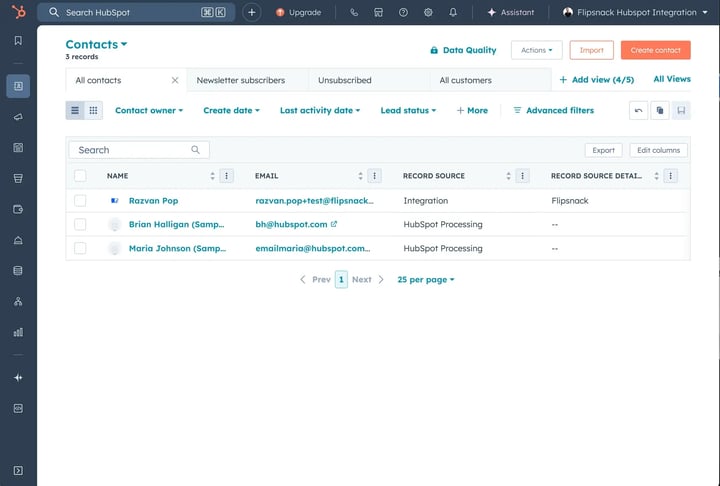
Full setup: How to send lead form submissions to HubSpot.
What to do if HubSpot tracking does not fire
- After you install the tracking code, there may be a short delay before it is active. Enter the URL under Validate your tracking code in HubSpot.
- Make sure the Google Tag Manager container is installed on the domain you test, the tag trigger is All Pages, and the workspace was published, not only saved.
- If traffic shows under the wrong domain, check Additional site domains and the cross-domain linking settings in HubSpot Advanced Tracking.
- For one flipbook, check Customize > Add-ons > HubSpot tracking. If the panel asks you to connect your HubSpot account, connect HubSpot first.
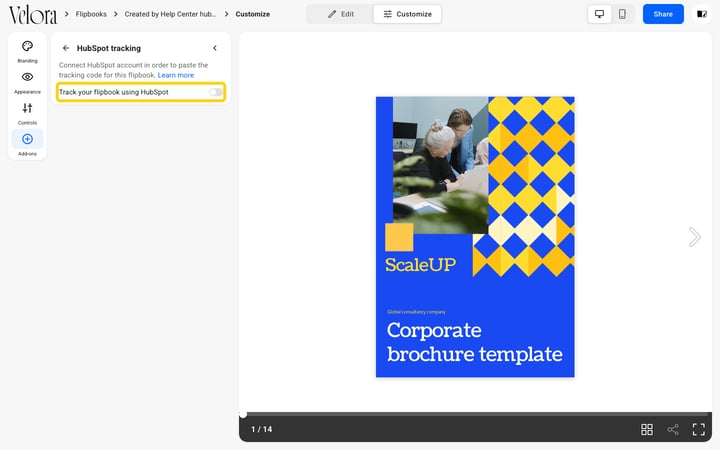
Full setup: How to track flipbook activity in HubSpot.
What to do if the reading progress event does not appear
- No event in HubSpot: make sure the flipbook is published and the domain is added to Advanced Tracking.
- Event with no contact: capture an email address before or during reading, for example with a lead form.
Full setup: Track flipbook reading progress with HubSpot custom events.
What to do if a HubSpot form does not show in the flipbook
- Make sure the HubSpot form code is copied in full and the form is published in HubSpot.
- For a HubSpot form pop-up, make sure the pop-up frame sits over a clickable element.
- Mandatory actions are not enforced in preview mode.
Full setup: How to embed HubSpot forms in a flipbook.
What to do if the HubSpot chat widget does not load
- Make sure the HubSpot tracking code is installed with Google Tag Manager, and check that the chatflow targeting includes your Flipsnack pages.
Full setup: How to add a HubSpot chat widget to a flipbook.
Next steps
Useful resources:
- How to connect HubSpot to Flipsnack
- HubSpot and Flipsnack: what the integration does
- How to send lead form submissions to HubSpot
- How to track flipbook activity in HubSpot
Need expert support?
Our team is here to help. Connect with our team experts or message us via the live chat for personalized assistance.