
Overview
A private flipbook is only as private as the people you send it to. The leak protection watermark stamps each reader's own email address across the pages while they read, so a screenshot or a screen recording carries the address of whoever took it. Turn it on in Publish your flipbook, under any private access option that identifies the reader by email.
💡 Benefits of adding a leak protection watermark
- Leak deterrence: Discourages unauthorized screenshots and recordings
- Reader traceability: Displays the exact email address of the viewer
- Increased accountability: Encourages responsible content usage
- Flexible distribution: Works across private sharing options that identify the reader
- Stronger content protection: Ideal for confidential or restricted materials
When enabled, the feature displays the reader’s email address as a visible watermark inside the flipbook player. If someone takes a screenshot or records the screen, the email address of the person who accessed the flipbook will be clearly visible.
.png?width=720&height=401&name=Readers%20leak%20protection%20-%20private%20flipbook-mh%20(3).png)
This feature acts as a deterrent against content leaks and helps you identify the source if sensitive information is shared without permission.
The watermark works across any private sharing option that identifies the reader individually, not just Readers only. Password-protected sharing is the single exception, because that flow does not identify who is behind the password. Every other private sharing setup keeps the extra traceability layer, so choosing a distribution method no longer means trading away security.
Requirements
- Plan: Enterprise: contact sales
- Note: If you don’t have access to this feature, contact our sales team.
Step-by-step guide
1. Open the publish settings
Click the visibility setting beside the flipbook to open Publish your flipbook. Share opens a different dialog that carries no visibility controls, so the watermark is not there.
.png?width=720&height=401&name=Readers%20leak%20protection%20-%20private%20flipbook-mh%20(6).png)
2. Set visibility to Private
Under Select visibility, choose:
- Private
Only people you give access to can view it. Choosing Private reveals Select private access, which opens on Only me.
3. Choose how you want to share it privately
Open Select private access and pick the option that fits your distribution.
- Only me
- Password protected
- Verify with a code (by email)
- Your team (Readers)
- Company SSO (Single Sign-On)
- Invite by email
As long as the option identifies each reader by email address, the leak protection watermark is available.
4. Enable Leak Protection Watermark
Scroll within the modal and check the option:
- Add leak protection watermark
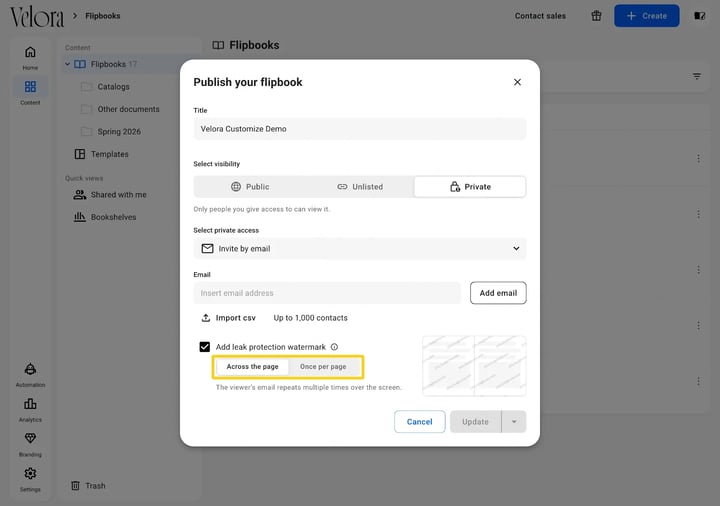
Ticking the box reveals two buttons: Across the page, which is selected by default, and Once per page. Pick one, then move on to Update.
5. Click Update
Click Update to apply the changes.
Your flipbook will now display the email watermark for each authorized reader.
Where the watermark applies
The watermark follows the reader, not the sharing method. Any private option that verifies who the reader is can carry it.
- Available: private sharing options that identify the reader individually by email
- Not available: password-protected sharing, because readers are not identified individually in that flow
- Not available: public and unlisted flipbooks, since there is no identified reader to stamp
Tip: If you need traceability on a publication you were planning to protect with a password, switch it to a private option that asks readers to identify themselves.
How the watermark works
When a reader opens the flipbook:
- Their email address appears diagonally across the flipbook player
- The watermark is visible during navigation
- The watermark will also appear in screenshots or screen recordings
This makes it possible to trace the origin of leaked content back to the reader who accessed it.
Across the page, or once per page
Two layouts, and the buttons carry their own descriptions.

Across the page: the viewer’s email repeats multiple times over the screen.
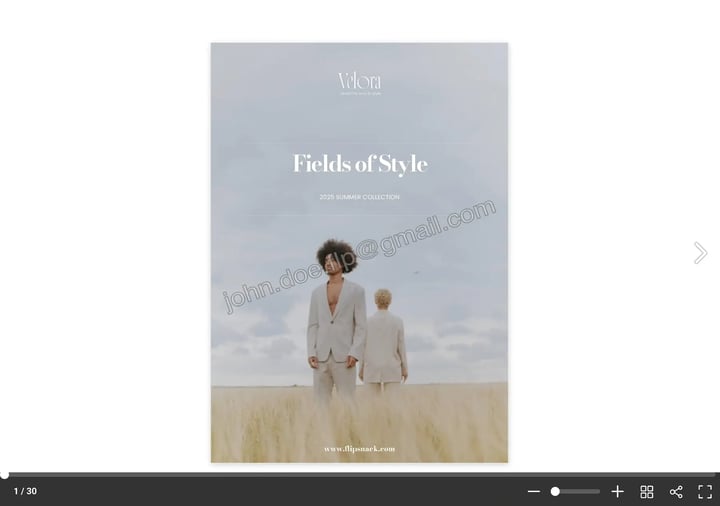
Once per page: the viewer’s email appears once, diagonally over the screen.
Verify with a code (by email) needs the addresses first. The setting does not save while the recipient list is empty, and it fails without an error: the modal closes and nothing sticks. Add every address, then save. The code proves the reader owns an address already on the list, so it is not a link anyone can open.
The watermark is visible inside the flipbook player. It does not modify your original PDF or design file.
Additional tips / FAQs
- Does the watermark appear for public or unlisted flipbooks? No. The feature only works for flipbooks shared privately, through an option that identifies each reader.
- Does it work with password-protected flipbooks? No. Password protection is the one private sharing option without a watermark, because readers are not identified individually.
- Can readers remove the watermark? No. The watermark is automatically generated based on the authenticated reader’s email address.
- Does this replace download restrictions? No. You should combine this feature with appropriate visibility and menu control settings (such as disabling Download PDF) for stronger protection.
Common use-cases
Troubleshooting
The watermark is not visible
Make sure:
- Flipbook set to Private: The flipbook is set to Private
- Sharing option identifies by email: The sharing option you picked identifies readers by email, and is not password protection
- Watermark enabled: Add leak protection watermark is enabled
- Reader's assigned email: The reader is accessing the flipbook through their assigned email
The option is not available in my account
The feature is available on Enterprise and selected Custom plans. Contact the Flipsnack team to enable access.
The checkbox is missing for this flipbook
Check which private sharing option is selected. Password-protected sharing does not support the watermark, so the option will not appear there.
Next steps
- Sharing your flipbook with readers
- Publishing options explained
- Managing reader access
- Menu controls in the flipbook player
- How Flipsnack ensures Data Rights Management (DRM) for your digital content
- Securing your flipbooks with password protection
Need expert support?
Our team is here to help. Connect with our team experts or message us via the live chat for personalized assistance.