
Overview
A custom domain that does not resolve, stays on Pending, or opens the wrong page nearly always comes down to one of three causes: the CNAME record does not match the value Flipsnack generated, a proxy is still switched on at your DNS provider, or the change has not propagated yet. Verification in Flipsnack can complete about 5 minutes after the record is correct, but DNS propagation takes up to 48 hours.
Work through the checks below in order. Each one rules out a cause, so you finish with either a working domain or a specific detail to hand to support.
Requirements
- Plan: Business or above: check your plan or compare plans
- Setup: a subdomain already entered in Flipsnack under Branding > Brand profile > Settings > Custom domain: set up a custom domain
- Access: permission to edit DNS records at the provider hosting your domain.
Compare the CNAME record against Flipsnack
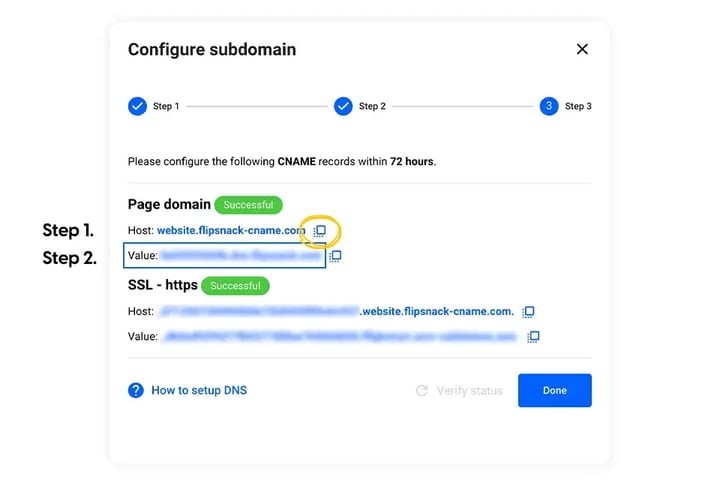
- Open Branding > Brand profile > Settings > Custom domain in Flipsnack. The Configure subdomain popup shows one Host and Value pair, under Page domain. The SSL - https row below it is a status line, not a second record to create.
- Copy each value with the copy icon beside it instead of retyping it. One wrong character stops verification.
- In your DNS provider, confirm a CNAME record exists for that Host, with the matching Value as its target.
Switch the proxy off
- If your DNS provider offers a proxy, set the record to DNS only. A proxy routes traffic through the provider’s servers instead of Flipsnack’s, which interferes with how Flipsnack verifies and serves a custom domain.
- In Cloudflare this is the Proxy status column: click the orange cloud so it turns grey. Fix Flipsnack custom domain issues with Cloudflare has the full path.
- Save the record, then reopen it and confirm it still reads DNS only.
Confirm the record resolves
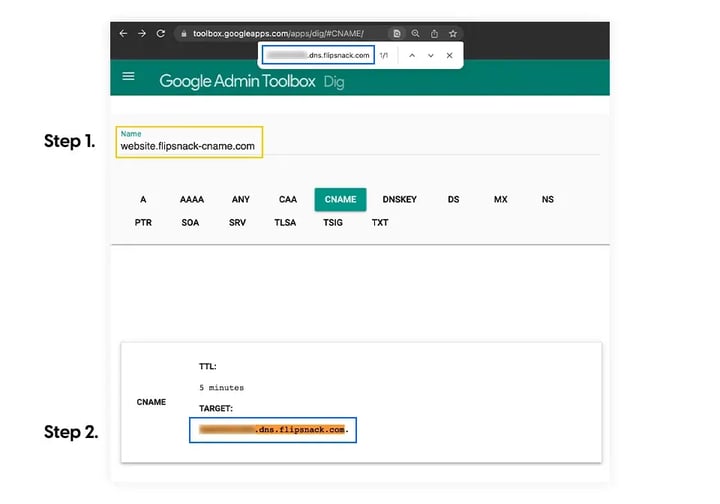
- Open Google Admin Toolbox Dig and select the CNAME tab.
- Paste the Host from Flipsnack into the Name field.
- Check that TARGET in the result matches the Value Flipsnack shows for the Page domain record. That value is unique to your setup, so compare it against the popup rather than against a value from another article. If it is blank or different, the record has not been saved or has not propagated yet.
Run verification again
- Return to Custom domain in Flipsnack and click Verify status.
- Allow about 5 minutes for the status to move from Pending to Successful.
- If the record is correct and the status has not changed, wait and try again. Global propagation takes up to 48 hours.
Troubleshooting
- Status stays Pending after 48 hours: delete the custom domain in Flipsnack, delete the CNAME records at your DNS provider, and set the domain up again from the start. Flipsnack asks for the records to be in place within 7 days, so a setup left unfinished past that has to be redone.
- The certificate you imported is rejected: the private key must match the certificate, be unencrypted, and be in PEM format. How to import your own SSL certificate for a custom domain lists every requirement.
- You switched between Flipsnack SSL and your own certificate: reset the CNAME record in your DNS settings, then verify again. Changing the SSL type changes the records Flipsnack expects.
- The domain stays pending with everything correct: a domain or publication flagged by an automated review waits for a manual check before it verifies. Contact support rather than redoing the setup again.
- The custom domain fields are greyed out: the setting is read-only when your plan no longer includes custom domains. What to do if your custom domain settings aren't editable covers how to unlock it.
Additional tips / FAQs
- How long should propagation take? Usually a few hours, and up to 48 in the worst case.
- Do I edit the CNAME in Flipsnack or at my provider? Flipsnack generates the host and value; you create the matching record at whichever provider hosts your domain, such as GoDaddy, Cloudflare or Namecheap.
- What should I send support? The subdomain, the host and value you entered, a Dig result for that host, and the checks above you have already run.
Next steps
- How to add your own custom domain or subdomain in Flipsnack
- Fix Flipsnack custom domain issues with Cloudflare
- How to import your own SSL certificate for a custom domain
- What to do if your custom domain settings aren't editable
Need expert support?
Our team is here to help. Connect with our team experts or message us via the live chat for personalized assistance.