
Overview
If you're using Salesforce for lead generation or customer data collection, you can now embed your Salesforce forms directly into Flipsnack flipbooks. Choose between placing them inline on a page or inside a popup window to suit your design and engagement strategy.
💡 Benefits of embedding a Salesforce form in your flipbook
- Seamless Salesforce integration: Use existing forms without redirecting traffic
- Higher conversion rates: Capture leads in a distraction-free reading experience
- Design flexibility: Display forms inline or in popup frames
- Custom experience: Match form behavior to your flipbook’s layout and purpose
This guide walks you through both options using the Salesforce form embed and Salesforce form pop-up interactions.
Requirements
- Plan: Enterprise: contact sales
- Tip: To get your Salesforce form embed code, follow this Salesforce guide on how to deploy forms using Marketing Cloud (formerly Pardot). You'll need to copy the iFrame embed code from your form's settings.
- Salesforce account: You’ll need a valid embed code from a Salesforce form
Embed a Salesforce form directly on the page
To embed your form using the Salesforce form embed interaction:
- Open your flipbook in Design Studio.
- Click on the Interactions tab on the left-side panel.
- Scroll to the Engagement section.
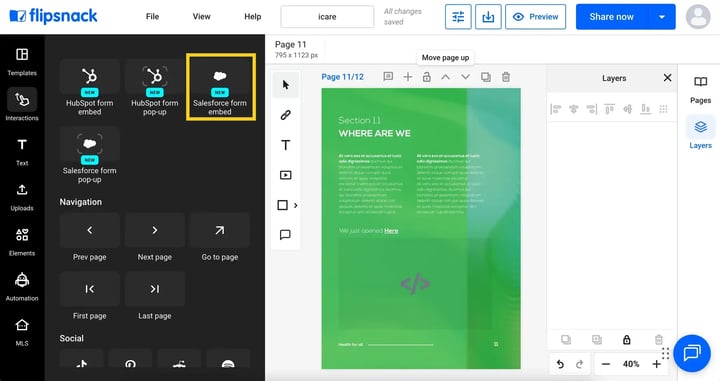
- Drag the Salesforce form embed interaction onto your desired page location.
- In the left panel, paste your Salesforce embed code. If you haven't generated one yet, follow this Salesforce guide to retrieve the iFrame code from your form's settings.
Embed a Salesforce form in a popup window
To display your form in a popup that opens on click:
- In the Interactions tab, find and select Salesforce form pop-up.
- Place the popup frame over a button, image, shape, or any clickable element.
- Resize and reposition the frame to match your layout.
-
In the popup settings panel:
-
Paste your Salesforce embed code. Need help finding it? Follow this Salesforce guide to get the correct iFrame code.
- Add a Tooltip message (e.g., “Open form” or “Click to fill out”)
-
- Adjust the frame’s color and transparency as needed.
- Preview the flipbook to test the popup interaction.
-png-1.png?width=720&height=381&name=Screenshot%202025-12-04%20at%2014-58-48-mh%20(1)-png-1.png)
Require a mandatory Salesforce form submission
Embed a Salesforce form as a pop-up and require every reader to submit it before they can continue reading. Ideal for gate-keeping documents when you need a custom CRM form to qualify leads, control access, and sync submissions straight into your existing workflows.
- Select the embedded Salesforce form on your Canvas.
- Navigate to the Properties bar on the right side of the screen.
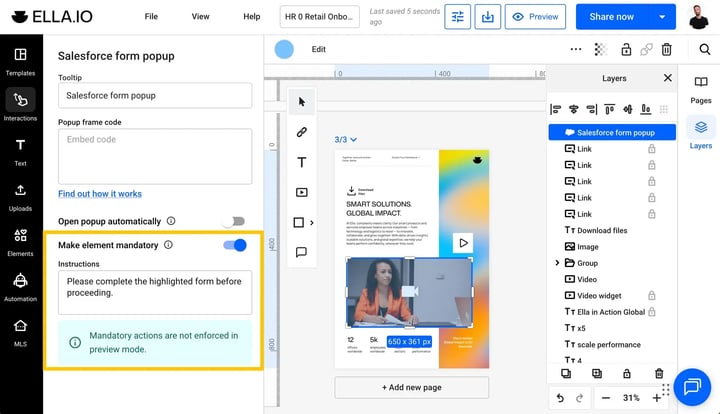
- Toggle on the Enforce mandatory action option. You can also add custom instructions to the prompt that will appear on screen before moving to the next page.
Once enabled, readers will not be able to interact with the rest of the document until the form is successfully submitted.
Additional tips / FAQs
- Where do I get the embed code? You can generate the embed code from Salesforce's form settings. Refer to Salesforce's official form deployment guide for instructions.
- Can I use any Salesforce form? Yes, as long as it provides an embeddable iFrame code.
- What type of code works best? iFrame code is recommended for compatibility.
- Can I customize the Salesforce form inside Flipsnack? No, customization must be done in Salesforce before copying the embed code.
Common use-cases
- Sales outreach: Add forms to request demos in product presentations
- Lead capture: Collect info during real estate or business brochure viewing
- Client intake: Embed onboarding forms in digital handbooks
Troubleshooting
Form not displaying?
- Code incomplete or modified: Ensure the code is complete and not modified
Popup not triggering?
- Popup frame overlap: Check that the popup frame overlaps a clickable object and is on top of it.
Next steps
- How to embed any iframe content in your publication
- How to use a Popup frame to add pop-up content
- How to customize your flipbook player settings and controls
- Actions in Design Studio: making elements interactive
Need expert support?
Our team is here to help. Connect with our team experts or message us via the live chat for personalized assistance.