
Overview
To duplicate a flipbook, open the three-dot menu beside it in Content, choose More options, then Make a copy. The copy appears in the same list with the same name, and it is a separate publication: editing it, publishing it or deleting it leaves the original untouched.
A copy is the safe way to try a redesign, to build next month's issue from this month's, or to hand a teammate a version to work on while the published one keeps serving readers.
How to make a copy
- Open Content and find the flipbook in the list.
- Click the three-dot button beside it.
- Choose More options, then Make a copy.
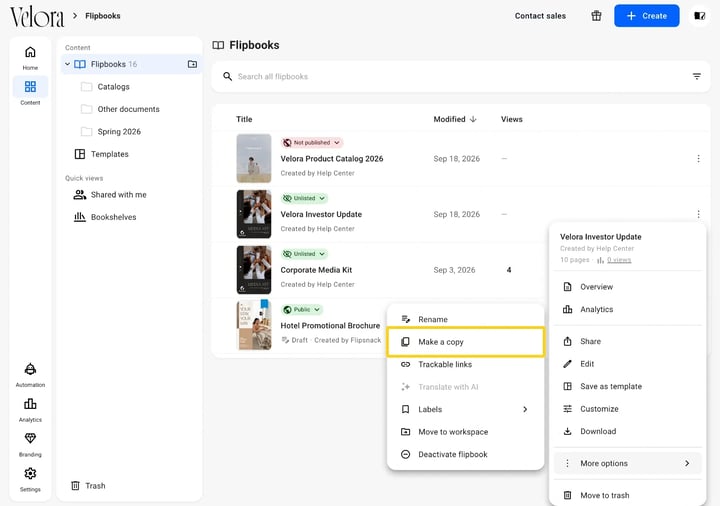
The copy is created immediately and lands in the same folder. Rename it from the same menu, under More options then Rename, so the two are not easy to confuse.
Tip: A copy never carries the original's statistics. Views, reads and clicks stay with the flipbook that earned them, so a copy starts at zero.
Using a copy to unpublish
A copy is also a way to take a published flipbook offline while keeping the design. Copy the original, then move the original to Trash. What you are left with is an unpublished version you can work on and publish again later.
It is worth knowing this costs you the link and the statistics: the copy has a new address, so anywhere the old link was printed or embedded stops working. If you only want to hide a flipbook, deactivating it keeps both.
Additional tips / FAQs
- Does the copy keep my interactive elements? Yes. Links, videos, buttons and forms all come across, because the copy duplicates the design rather than the file.
- Does a copy count against my plan? Yes, it is a flipbook like any other, so it counts toward the published flipbook limit once you publish it.
- Can I copy into a different workspace? Not with this option. Use More options then Move to workspace, which moves the flipbook rather than duplicating it.
- I want the design again and again, not once. Use Save as template from the same menu instead. A template is meant to be reused; a copy is a one-off.
- Where did the copy go? Into the same folder as the original, with the same title. Sort by Modified and it is at the top.
Next steps
- What the Content tab holds and how it is organized
- How can I unpublish a flipbook?
- How to recover a flipbook you deleted
- How to save and reuse your own templates
Need expert support?
Our team is here to help. Connect with our team experts or message us via the live chat for personalized assistance.