
Overview
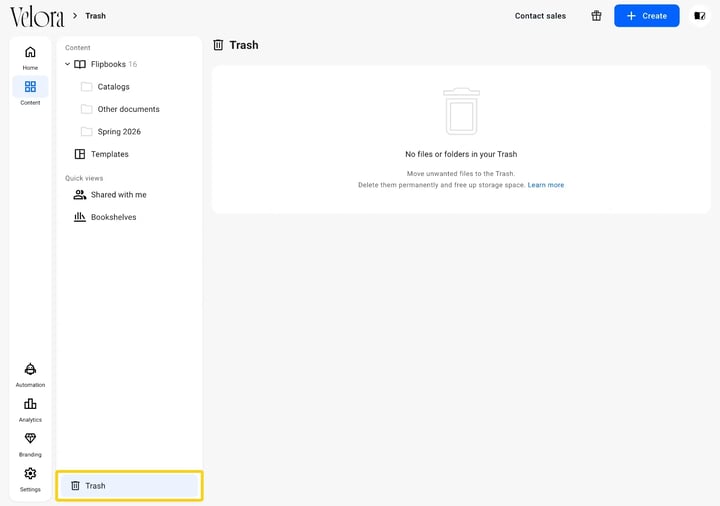
Open Trash at the bottom of the Content rail, find the flipbook, and choose Restore from its More actions button. It returns to the list with its statistics and its link intact, so any embed or shared link keeps working. A flipbook you have deleted forever cannot be brought back.
Trash empties itself after 21 days. Deleted flipbooks and folders are then removed permanently.
Restoring a flipbook
- Open Content from the icon rail, then Trash at the bottom of the rail beside it.
- Find the flipbook and click its More actions button.
- Choose Restore. The flipbook goes back where it was.
The same button holds Delete forever, which removes the flipbook without a second chance. Those two are the only actions on a trashed item.
When Trash is empty
An empty Trash reads No files or folders in your Trash. If the flipbook you want is not listed, either it was deleted more than 21 days ago, or it was deleted forever, or it sits in a different workspace.
How a flipbook gets there
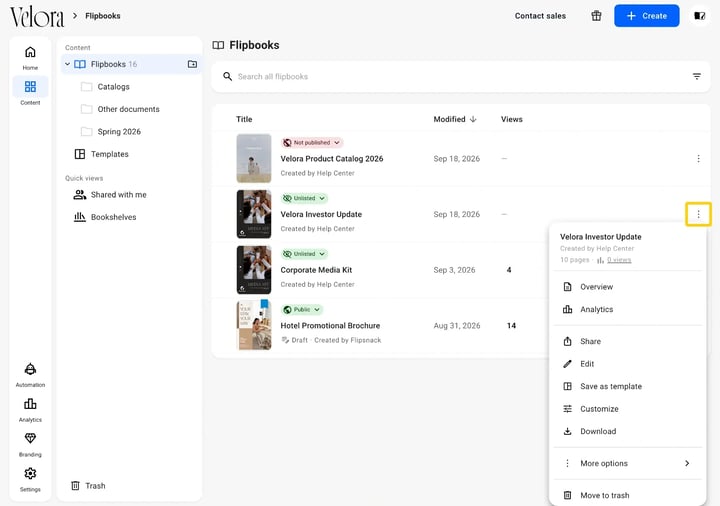
Move to trash, at the bottom of the three-dot menu beside a flipbook, is what puts it in Trash. Until you restore it or delete it forever, that is where it stays.
Additional tips / FAQs
- Do I lose the statistics? No. A restored flipbook keeps the views it had collected.
- Does the link change? No. The flipbook comes back on the same link, so an embed on your site starts working again.
- Can I recover something deleted forever? No. Delete forever and the 21 day sweep both remove the flipbook permanently.
- What happens to a folder I trashed? It restores the same way, with what was inside it.
- Someone else deleted it. Where is it? In the Trash of the workspace it belonged to. Switch workspace from your avatar in the top right.
Next steps
- How Trash works
- What the Content tab holds and how it is organized
- How to organize flipbooks with folders and subfolders
Need expert support?
Our team is here to help. Connect with our team experts or message us via the live chat for personalized assistance.