
Overview
Canceling a Flipsnack subscription stops it from renewing, but access continues until the end of the current billing period, followed by a 21-day grace period during which existing flipbooks keep their premium features. After the grace period, the account switches fully to Free plan limits and premium features on those flipbooks stop working. You cancel from Settings > Billing (or Subscription) in the main dashboard.
How to cancel your subscription
You can cancel your Flipsnack subscription at any time from your account settings:
- Click Settings in the bottom-left of the main dashboard, or open the account picture dropdown.
- Select Billing (or Subscription) to view your current plan details and available actions.
- Click Cancel plan.
- Confirm the cancellation by clicking Cancel plan again.
- Optionally, complete the cancellation survey after canceling.
Note: After you cancel, your subscription remains active until the end of the current billing period. After that date, it will not renew.
The 21-day grace period
When you downgrade from a Premium plan to a Free account, all your existing flipbooks retain their premium features for a 21-day grace period.
- Account status: Your account immediately switches to Free.
- Flipbook status: Your flipbooks continue displaying premium features, such as interactivity and no watermarks, for the 21 days.
- Creation and editing limits: You cannot create new publications or add/edit premium features, but existing flipbooks remain visible and intact for now.
After the grace period
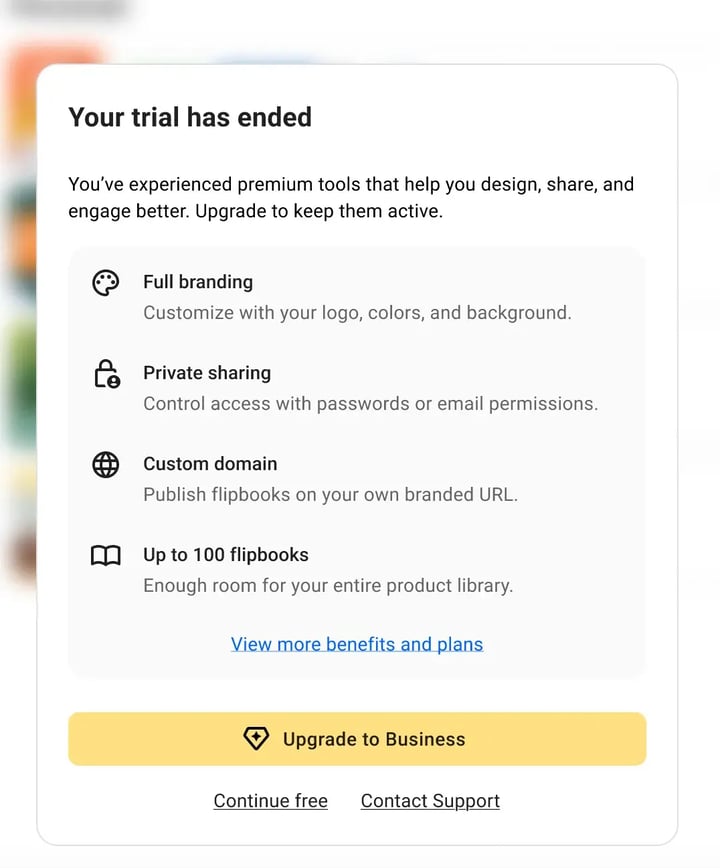
You'll see a banner in your workspace with three options:
Upgrade to Business, Continue for Free, or Contact Support for personalized help.
Free plan limitations
If you decide to continue on a free plan, here are the main limitations:
- You can create maximum 5 flipbooks in your account
- Each flipbook can have a maximum of 15 pages.
- Downloads are not available — you can’t export your flipbooks as PDF, JPG, PNG, GIF, MP4, or HTML5.
- You can only publish flipbooks publicly (no password protection, OTP, or private sharing options).
- Analytics and tracking features (views, heatmaps, and reader stats) are disabled.
- You can’t use AI tools (translation, summaries, feed mapping, etc.).
- Automation and product catalog generation are not available.
- You can’t add interactive elements such as videos, slideshows, quizzes, forms, product tags, or charts.
- You can’t customize branding (logos, colors, fonts, or watermark removal).
- You can’t download or print your flipbooks.
- You can’t add teammates or manage multiple teams, brands, or workspaces — the Free plan is for one user only.
- Integrations (like Zapier or Google Tag Manager) and API access are not included.
How to check if your subscription is canceled
To confirm the cancellation, sign in and go to the Billing (or Subscription) section. If the page shows a Renew plan option instead of Cancel plan, your subscription is already canceled and will not renew.
How to renew a canceled subscription
If you change your mind, open Billing and choose Renew plan. For more details, see How to renew your Flipsnack subscription before the renewal date.
Next steps
- How to renew your Flipsnack subscription before the renewal date
- How can I cancel my free trial?
- How to cancel the auto-renewal of a subscription
- Free plan in Flipsnack
- How to purchase or upgrade your Flipsnack plan
- How to update your payment information
- Our refund policy
Need expert support?
Our team is here to help. Connect with our team experts or message us via the live chat for personalized assistance.