
Overview
After you upgrade to a premium subscription, your flipbooks need a short moment to reprocess before the Free plan limitations disappear, most often the Flipsnack watermark on downloads and embeds. This usually takes up to 5 minutes, depending on how many flipbooks your account contains.
If nothing has changed after 5 minutes, work through the steps below:
1. Log out and log in
Sometimes, simply logging out of your Flipsnack account and logging back in could refresh your account status and solve the problem.
2. Clear the cache and cookies
Your browser might be loading an old version of the flipbook, which has been cached. In this case, the solution is to clear the cache and cookies. Just select your browser and follow the instructions from the link.
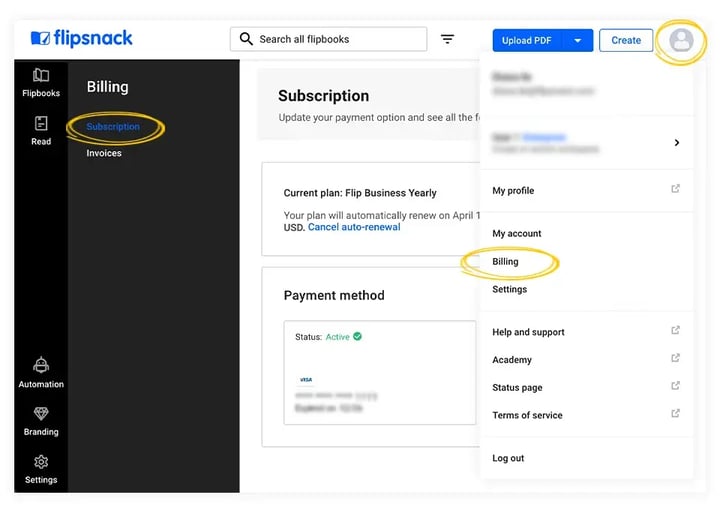
3. Check the subscription status
Confirm that your premium subscription is active and properly linked to your Flipsnack account. When in your Flipsnack account, navigate to your account settings or subscription details.
4. Verify the subscription plan details
Review the limitations and restrictions of the plan you have subscribed to, and confirm that the plan offers the features and benefits you anticipated.
5. Verify the payment completion
Confirm that your payment for the premium subscription has been processed successfully. Check your payment method (e.g., credit card, PayPal) to ensure that the payment went through without any issues. If you encounter any payment-related problems, please do not hesitate to contact Flipsnack support for assistance.
Next steps
Need expert support?
Our team is here to help. Connect with our team experts or message us via the live chat for personalized assistance.