
Overview
SEO stands for search engine optimization. Simply, it means optimizing your content and strategies for a better search results ranking. When search engine bots crawl and index your catalog, they cannot understand and index the text on your catalog pages.
💡 Benefits of optimizing flipbooks for search and AI answers
- Increase the organic visibility of your digital publications in search engine results.
- Drive qualified traffic to your business content through strategic keyword optimization.
- Enhance brand discoverability with properly indexed digital publications.
- Improve content performance with search-engine-friendly metadata.
- Track and measure your SEO efforts through integrated analytics.
This article will help you optimize your digital publications for search engines to increase organic visibility and drive targeted traffic to your business content. It shows you how to leverage Flipsnack's built-in SEO capabilities to enhance your content's discoverability and reach your target audience more effectively.
There are many ways for people to discover your publications. One of the most common ways is through a simple search engine search result. So with that in mind, this article is designed to help you better your catalog's ranking odds by implementing some simple SEO tips.
SEO stands for search engine optimization. In simple words in means optimizing your content and strategies for a better search result ranking. In this article we'll only talk about how that applies to your page flip catalog.
Tip: You can have your flipbook contents indexed by traditional search engines and AI engines. No request needed. Open Optimize SEO on a published, public flipbook and use the Text for crawlers tab. Crawlable text extraction needs Business or Enterprise.
Requirements
- Any paid subscription.
Step-by-step guide
Here’s exactly what you should do if you want to have your catalog indexed and ranking for a relevant keyword.
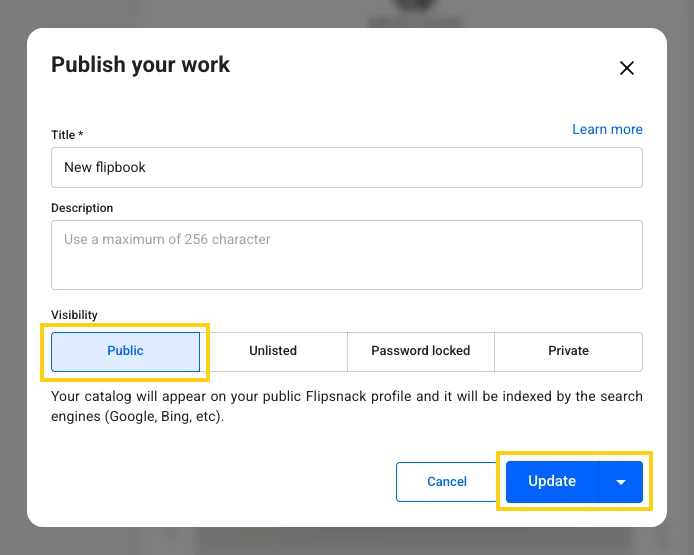
1. Set flipbooks to public
We need to start with this point because it really doesn’t matter what SEO techniques you use if you don't make your flipbook public. Setting it to Public allows Google to index it, which means that Google (or whatever search engine you’re using) will identify it and then rank it.
Unlisted or private catalogs published on Flipsnack use a noindex tag, which tells Google bot not to include the catalog in its index. This is great if you want to keep a catalog private, but if you want it to rank in Google, you must ensure that your catalog is published as Public. You can edit the visibility status of a catalog form Unlisted to Public, but not the other way around.
2. Select keywords strategically
Effective keyword strategy is crucial for maximizing your digital publications' visibility and driving qualified traffic to your content. While SEO remains highly competitive in the B2B space, implementing a strategic keyword approach can significantly enhance your content's discoverability and market reach.
The Challenge: Generic keywords like "magazine" or "catalog" face intense competition from established industry players, making it difficult to achieve meaningful search rankings and diminishing your content's potential impact.
The Solution: Implement a targeted three-component keyword strategy that combines:
- Your organization's brand identity;
- Publication type classification;
- Distinctive temporal or series identifier.
An example structure for optimal business visibility:
[Brand Name] + [Publication Type] + [Unique Identifier] = Global Solutions Product Catalog Q1
Now that you know the best main keyword for your catalog, it's important to understand how to use it.
Title
Before you publish a flipbook, you'll need to set a name or title. That title will be used as a meta title for your publication so that it will appear in search engine results pages. Here's where it is really important to use the main keyword as the title, or as part of the title. It matters, and it will help your catalog rank for the keyword that you decided to target
The same title is also used in the catalog URL, which is also a ranking factor. Thus, it is all the more important to use your main keyword in the title.
No need to add any extra words other than your main keyword because our system also adds your name as author in the meta title, and the entire meta title should be shorter than 60 characters.
Description
The description you write for your catalog when you publish it is also important. The first part of it will be used in the meta description.
- it needs to be unique;
- it should contain a short overview or summary of what your catalog is;
- use your keyword in the description;
- keep the most important information and keywords at the beginning of the description;
- (optional) end with an invitation for people to read your catalog.
Here are some examples of good descriptions:
- The 2020 XYZ Student Guide is the official resource for student-athletes from USA interested in playing school sports. Start reading
- A guide to booking your newborn sessions and baby photoshoots with PhotoBrands - New Jersey Newborn, Maternity, and Family Photographer
Meta title and meta description
On top of the title and description above, you can set a dedicated meta title and meta description. These are the fields that appear in search results; when they are empty, search engines fall back to the publication's title and the first part of its description.
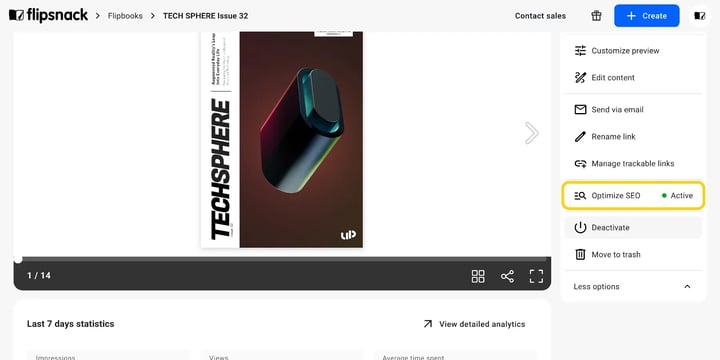
Both live in the Optimize SEO panel, on the Search appearance tab. From your published flipbook's Overview page, click More options in the right panel, then select Optimize SEO. Fill in Title and Description, then click Save. Writing these two fields by hand is available on every plan.
Note: Optimize SEO is available for flipbooks that are published and set to Public. On any other visibility the option is greyed out, with the tooltip Available for public flipbooks only.
To have Flipsnack write these fields for you instead, use the AI generation below.
Generate your meta title, meta description, and abstract with AI
You do not have to write these fields manually. Flipsnack can generate a meta title, a meta description, and an abstract with AI, based on the content of your publication. This makes getting your flipbooks to rank much less work.
Step 1: From your flipbook's Overview page, click More options in the right panel, then select Optimize SEO.
Step 2: In the Search appearance tab, click Generate. Each generation uses 10 AI credits. AI generation needs the Business or Enterprise plan.
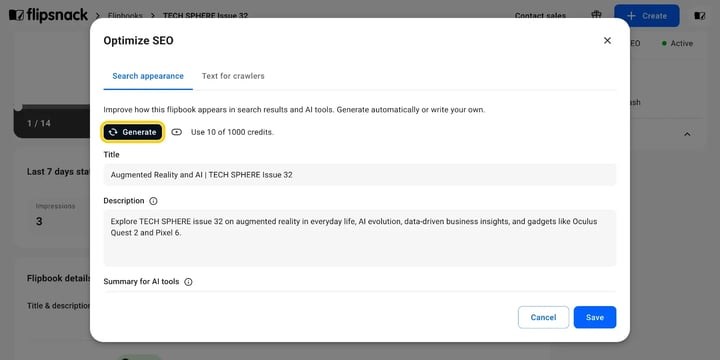
Step 3: Review the generated Title (your meta title), Description (your meta description), and Summary for AI tools (your abstract). Adjust them to include your target keywords if needed, then click Save.
Tip: Not happy with a result? Click Regenerate to get a new version. You can also edit any field manually before saving.
The Text for crawlers tab in the same pop-up lets you extract the text from your flipbook so search engines and AI tools can read it. Learn more in our article about making your flipbook readable by search engines and AI tools.
Backlinks
In this case, a backlink is simply a link from one website to your catalog. If you have a website, it would be great to include a link to your catalog or to embed it.
Adding links from your site or blog to your catalog has some major benefits:
- It will help Google bots crawl and index your page faster,
- It can significantly help your catalog's ranking odds. Bonus points if you place the link on an anchor text that contains your keyword,
- SEO aside, it will also help drive traffic to your catalog. It’s another way to promote your hard work.
Important: Embedding your catalog on your site does provide similar benefits.
What's next?
- To get more traffic to your catalog, you should also consider exploring other promo ideas besides SEO. One of the best ways to promote your content is to share your catalog to get more exposure. Find out more about all sharing options available with Flipsnack.
- The domain name is also a ranking factor if you're using parts of the keyword in the domain name. With a Flipsnack Business plan or Enterprise, you can use your own domain for all your catalogs. Read more about custom domains.
Important: We generally advise using a custom domain or subdomain from your site for branding purposes and not for SEO. That being said, it's essential to know that if you set a subdomain such as: magazines.condenast.es it will help your chances to rank in Google for "condenast magazines". You can replace condenast with your own website/ brand name and magazines with any word that you target as a keyword (catalogs, issues, reports, communication, documents etc), and you get a custom subdomain that you could use with Flipsnack.
See what other users are saying about this on our Flipsnack community page.
Next steps
- AEO and GEO for Flipsnack flipbook catalogs explained
- How to make your flipbook AI-readable with text for crawlers
- Flipsnack publishing options explained: who sees a flipbook
Need expert support?
Our team is here to help. Connect with our team experts or message us via the live chat for personalized assistance.