
In organizations with multiple content creators, coordinating editing access is crucial for maintaining workflow efficiency. Flipsnack's takeover feature enables seamless transitions between editors while protecting all content changes.
💡 Benefits of taking over a flipbook from another editor
- Prevent content conflicts and overlapping edits
- Maintain version control across teams
- Track editing activities in real-time
- Ensure smooth handoffs between teammates
- Protect work-in-progress content
Requierments: This feature is available starting with our Business plan.
For workspaces with multiple users, our real-time tracking system gives you full visibility into editing activities. Navigate to Content to see which teammate is currently editing each publication:
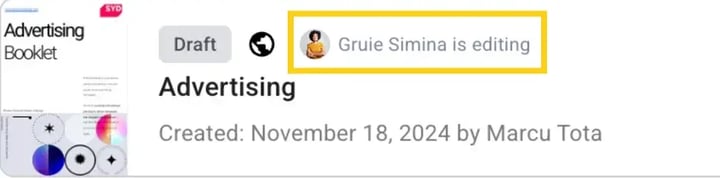
Important: All teammates from a workspace can see in Content which colleague works on which flipbook.
When you need to access a flipbook currently being edited by another teammate:
- Click Edit on the desired flipbook
- You'll receive a handover prompt
Select Take Over to initiate the transition
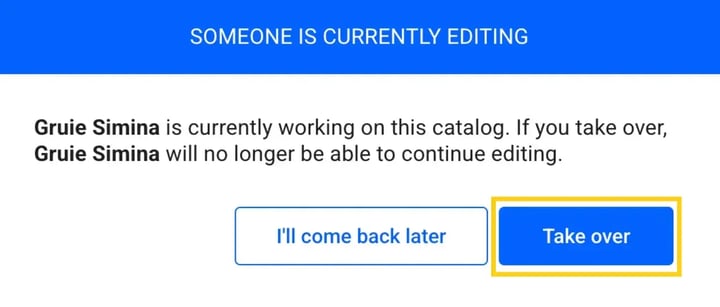
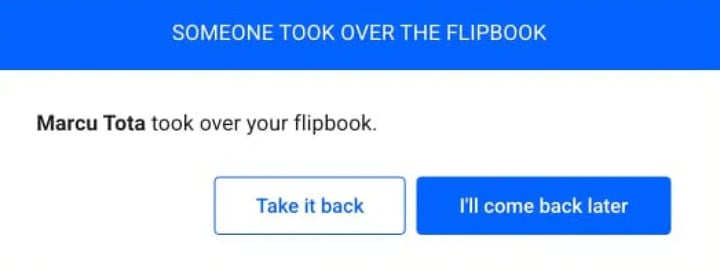
The previous editor will receive a notification about the handover, with two options:
- Take it back - Reclaim editing access
- I'll come back later - Return to Content and continue with other tasks
Take your team's collaboration further with integrated tools:
- Comments for detailed feedback
- Page notes for project documentation
Next steps
Need expert support?
Our team is here to help. Connect with our team experts or message us via the live chat for personalized assistance.