
Overview
Flipsnack can generate a video from a text prompt. You describe the scene, and Flipsnack makes a short video you can use in your flipbook. You do not need a starting image.
This is different from AI Animate, which starts with an image and turns it into an animation.
Requirements
- AI credits: each video uses credits. Design Studio shows the cost under the Generate video button. See AI credits explained.
How to generate a video from a text prompt
- Open a flipbook in Design Studio.
- In the left rail, click Elements. Under Graphics, click Generate video.
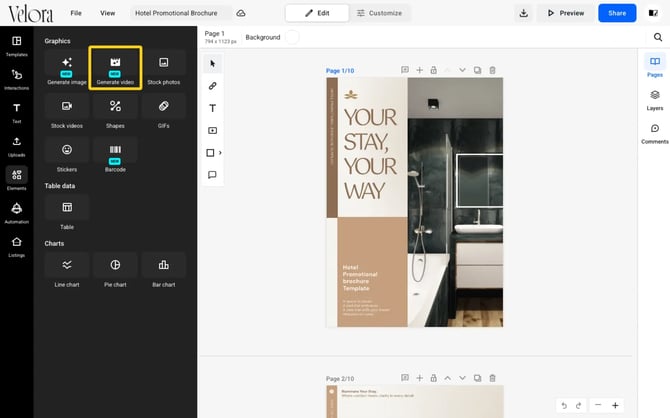
- In the prompt box, describe the scene: subject, setting, camera movement and mood. The box takes up to 1000 characters.
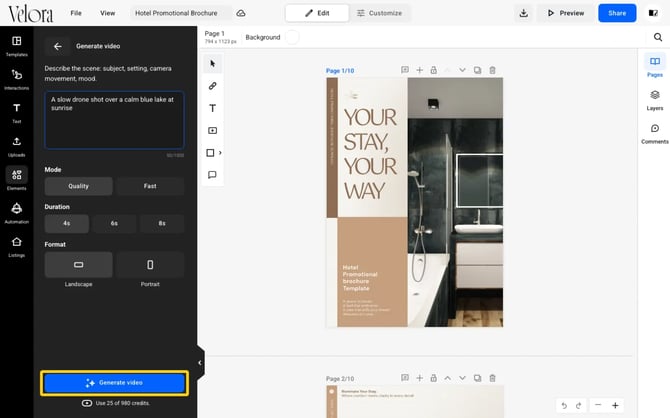
- Under Mode, select Quality or Fast.
- Under Duration, select 4s, 6s or 8s.
- Under Format, select Landscape or Portrait.
- Check the credit cost under the button, then click Generate video.
What a video costs
- A 4 second video uses 25 AI credits.
- An 8 second video uses 50 AI credits.
- Quality and Fast show the same cost.
Next steps
- Learn how to generate an image from a text prompt.
- Learn how to animate a starting image with AI Animate.
- See how AI credits work.
Need expert support? Our team is here to help. Message us through the live chat.