
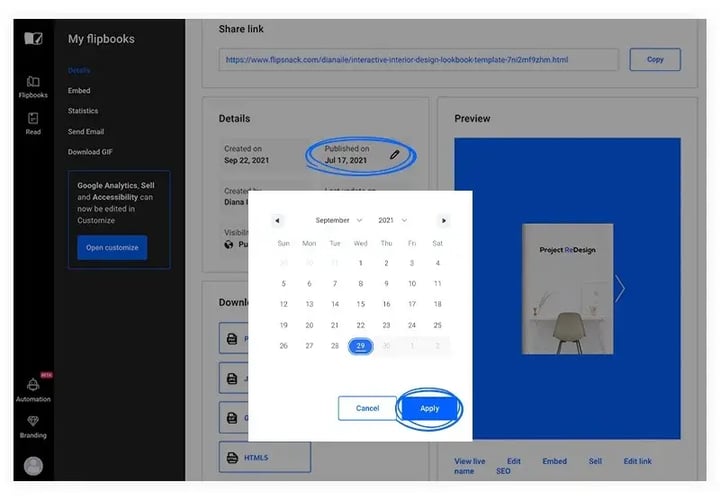
Flipbooks on your Flipsnack public profile page appear ordered from the most recently published to the least, and you control that order by changing each flipbook's publication date. In Design Studio, open a flipbook's Details panel and set a new Published on date to move it earlier or later in the list.
When you go to your Flipsnack profile you can notice that all your flipbooks are ordered from the last published one to the first one.
You can leave them as is, but if you want to arrange the order of your flipbooks, then this article is exactly what you need.
For this to happen, you need to change the publication date for the flipbooks that aren’t displayed in the order that you want.
This is the perfect option if you want to feature certain magazines, catalogs, academic documents, and business reports at the top of the profile instead of the chronological order.
Let’s see how you can change the publication date- Go to Design Studio -> Flipbooks and select the flipbook you want to modify its publication date.
- Click Overview and go to Published on and from here you can choose a date from the calendar.
- Repeat this action for each flipbook that you want to change the publication date and you’re done.
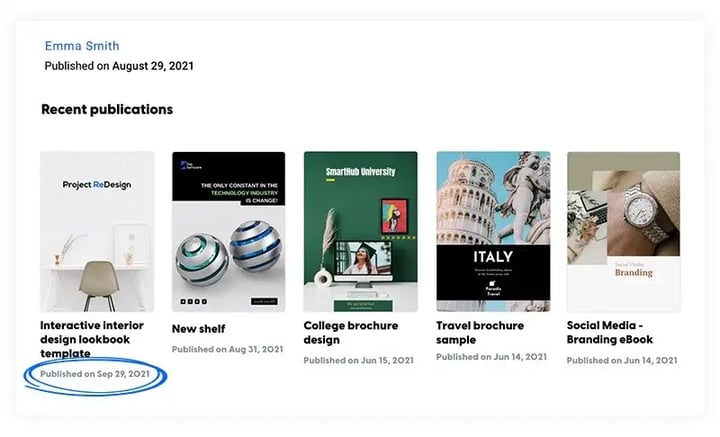
Now your flipbooks are arranged as you set them up. Easy and simple.
Next steps
- My Flipsnack profile: what it is and how to customize it
- Private profile: hide your page from search and visitors
- How to personalize your Flipsnack profile page and branding
Need expert support?
Our team is here to help. Connect with our team experts or message us via the live chat for personalized assistance.