
In case you have forgotten what your current pricing plan is, this article will highlight the necessary steps you need to take to precisely determine what subscription you have purchased.
Overview
You can see your current Flipsnack pricing plan from the Account picture dropdown in Content, or in more detail from the Billing section under Settings, which shows the Subscription page. From there, click See all the features to compare it against other subscription options on the pricing page.
Where can you find it?
There are two ways where you can look for this information:
- From Content
This is the fastest method. After you log into your account, you will be redirected to Content. Here, all you have to do is click on the Account picture located in the upper right corner. Your active subscription will be displayed in the dropdown menu.

- From the Billing section
The second method is to see how your subscription translates into your price. While in Content, either click on Settings in the bottom left corner, or from the Account picture dropdown menu in the upper right corner. From there, click on Billing, and you will access the Subscription page.
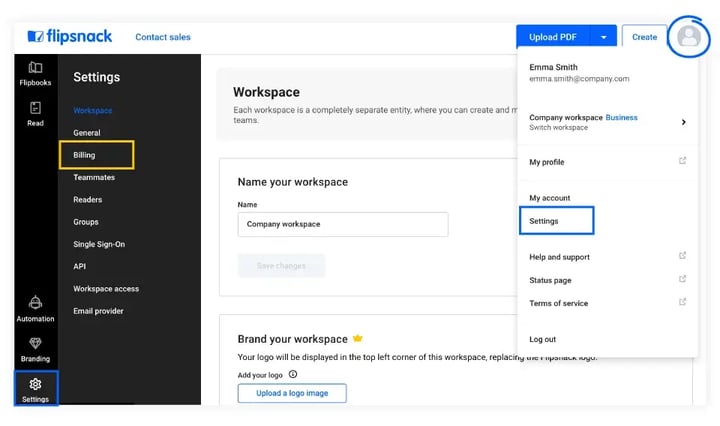
Here is where you can see your current plan.
For a more in-depth comparison, you will find our other subscription options explained in detail. Clicking on See all the features will take you to the pricing page, where you can learn more about each subscription option individually.
In some cases, you may notice that your active pricing plan is no longer available on our pricing page. Earlier generations of some plans are no longer sold. None of this affects an active subscription: it keeps working exactly as it did, at the price you signed up for.
If you need any further information regarding any of our pricing plans, do not hesitate to contact us via live chat. They are swift to answer any questions you may have.
Next steps
- Flipsnack pricing plans explained: Free to Enterprise
- What's different across Flipsnack's pricing plans?
- How to purchase or upgrade your Flipsnack plan and pay
Need expert support?
Our team is here to help. Connect with our team experts or message us via the live chat for personalized assistance.