
The Flipsnack Design Studio has dedicated keyboard shortcuts for general navigation, text editing and object editing, letting you work without reaching for the menus. They apply only inside the Design Studio, not elsewhere in the app. The article lists every shortcut as a reference image you can return to anytime.
We can all agree that shortcuts are a lifesaver. But there are dozens of them, and they're not so easy to remember.
So here, we wanted to compile a list of shortcuts so that you can reference them anytime they happen to slip your mind.
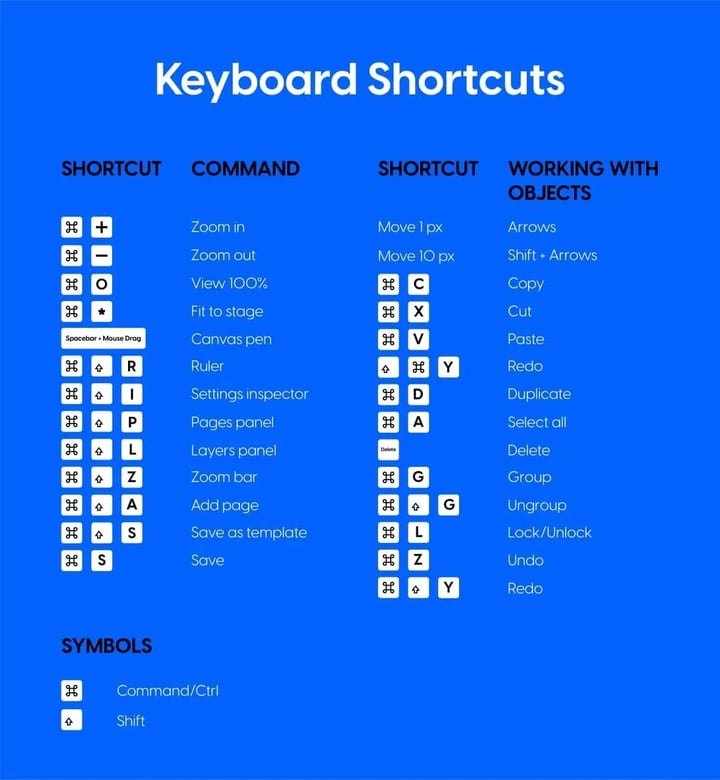
Bear in mind that these are shortcuts only for the Design Studio. You have general shortcuts, text editing shortcuts, and object editing shortcuts. All-in-all, this will be extremely helpful anytime you need to make your time in the Design Studio as quickly as possible.
Feel free to use this image as a reference anytime.
Next steps
Need expert support?
Our team is here to help. Connect with our team experts or message us via the live chat for personalized assistance.